
Canada / Solutions / Invoicing and recurring

Invoices that get paid, and billing that runs itself

Send a professional invoice by email or text, let the customer pay it online, and keep a card on file for the next one. Set up subscriptions, memberships, and service plans that bill on schedule, on one transparent rate.

See if it fits

Three jobs, one tool

Send a bill, bill again on schedule, and keep the card on file for next time.

Send and get paid

Build an itemized invoice, send it by email or text, and the customer pays it online. You see it the moment it is paid, and reminders go out on their own.

Recurring and scheduled

Memberships, service plans, retainers, and rentals bill on the schedule you set. No chasing, no monthly reminder on your calendar.

Card on file

Save a customer's card securely once, then charge the next job or the next month without asking for it again.

See it in action

An invoice going out, the customer paying it, and a recurring plan set up in a minute.
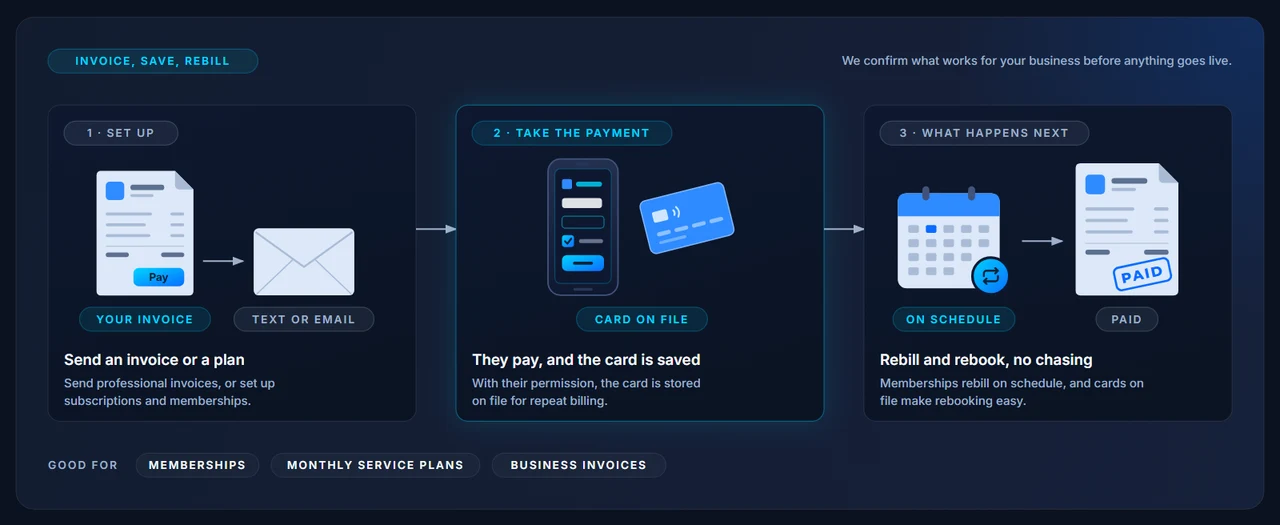
How invoicing and recurring billing works: send an invoice or a plan, they pay and the card is saved, rebill and rebook with no chasing.
Who it is for

For businesses that bill, not just ring up.

If your money comes in after the work, or every month, invoicing is how you stop chasing it. The customer pays online, the card stays on file if they agree, and the next bill goes out on its own.

On supported setups, one invoice can take a deposit up front and the balance later, with the running total shown to you and the customer.

See if it fits
Memberships and classesGyms, studios, and clubs billing monthly, with cards on file.
Service plansHVAC, pest control, lawn care, and cleaning on a schedule.
Trades and contractorsDeposit on approval, balance on completion, one invoice.
Business-to-businessNet terms, itemized bills, and a record of what was paid when.
Keep your books

Keep QuickBooks. Add better invoicing.

If you run on QuickBooks Online, you do not have to leave it. On the setups we offer for QuickBooks users, invoices and payments sync to your books, and each payment is matched to the deposit it landed in, so the month closes without hand-matching.

You keep your workflow. You get pay by text, email, QR code, and link, cards on file, and recurring billing, with our processing behind it.

How integrations work
Invoices syncWhat you send shows up in QuickBooks Online.
Payments match depositsEach payment is tied to its daily deposit, on supported setups.
One rateThe same transparent processing rate as the rest of your sales.
A person to callSetup and support from someone who knows your account.

Common questions

How does the customer pay an invoice?
They open it from the email or text, see the itemized bill, and pay with a card on a secure page. You see the payment right away, and the invoice is marked paid.
Can I bill customers automatically every month?
Yes. Set the amount and the schedule, save the customer's card with their permission, and the charge runs on its own. You can pause, change, or cancel a plan at any time.
Is it safe to keep cards on file?
Yes. The card is tokenized, which means the full number is replaced with a secure reference and is never stored in your systems. How we keep payments secure.
Does it work with QuickBooks?
Yes, on the setups we offer for QuickBooks Online users. Invoices and payments sync to your books, and payments are matched to the deposits they landed in. Tell us what you run and we will confirm the fit.
Can a customer pay part of an invoice now and the rest later?
On supported setups, yes. One invoice can take a deposit and then the balance, with the running total shown to both of you. We confirm this for your setup before you go live.

See what invoicing is really costing you

Send us a recent statement and we will go over every fee, then show you what a clean invoicing setup looks like next to it. No pressure, just the numbers.