
Home / Solutions / Virtual terminal

Take payments by phone, no hardware needed

A virtual terminal is a secure web page where you key in a customer's credit card for phone, mail, and remote orders. Log in from any browser, type the card number, and get paid. No terminal, no app, nothing to install.

Key in a card from any browser

Take credit card payments by phone, by mail, and from remote customers, all from one secure screen.

Phone orders

Take the card over the phone and key it in while the customer is on the line. Confirm the amount, run it, and read back the approval. No callbacks, no waiting.

Mail orders

Got an order form, a faxed authorization, or a card on file from a mailed request? Key it in from your browser and process it on the spot.

Remote orders

Sell to customers who aren’t in the room. Deposits, quotes accepted by phone, and repeat orders are all handled from any computer with a browser.

Who it is for

Built for businesses that sell over the phone.

If your customer isn’t standing at a counter, a virtual terminal is how you get paid. You only need a browser and a login.

Offices that bill clients, service businesses that collect deposits before the truck rolls, nonprofits taking donations, and any team that does over-the-phone sales all run on it every day.

See if it fits
Offices & professional servicesBill clients and collect payment by phone without a terminal on every desk.
Service businessesTake deposits and final payments before and after the job, from the office.
NonprofitsAccept donations and pledges called in over the phone.
Over-the-phone salesClose the sale on the call and key the card while the customer is on the line.
Secure by design

Yes, it is safe to key in cards.

Card data is encrypted in transit and tokenized, so the full card number isn’t left sitting in your systems. The virtual terminal runs over a secure connection, and you can store a card on file for repeat customers without handling the raw number yourself.

It is the same security approach that protects in-person and online payments, applied to the cards you key in by hand.

How we keep payments secure
EncryptedCard details are protected in transit over a secure connection.
TokenizedThe full card number is replaced with a token, not stored in the open.
Card on fileSave a card for repeat billing without keying it in every time.
User loginsGive your team access with their own logins and a record of who ran what.
How an online payment moves, what the customer sees Service blueprint with five stages from tapping pay to the money landing, showing what the customer sees above a line of visibility and what happens behind the counter below it: the AllProPay gateway turning the card into a token, the processor, card network and the customer's bank answering in seconds, and the funds settling to your bank account later, with only the token, the answer and the money ever reaching your records. ONLINE CHECKOUT SECONDS LATER Taps pay Token made Approved Receipt Money lands CUSTOMER SEES Enters the card at your checkout and taps Pay. The page holds for a moment. Nothing to do. Approved or declined shows on the screen. An order confirmation and a receipt by email. Nothing new. The purchase is already complete. LINE OF VISIBILITY BEHIND THE COUNTER ALLPROPAY The gateway collects the card, encrypted. It never touches your server. ALLPROPAY The card number becomes a token. The real number stays with the gateway. PROCESSOR NETWORK The processor routes it through the card network to the customer's bank, which says yes or no. YOU Your system stores the token and the answer, never the card number. YOU LATER Funds settle to your bank account as a separate step, on its own clock. YOUR RECORDS nothing yet the token yes or no the token and the receipt the money The real card number is never in your records. Only the token, the answer and the money reach your side. KEY Line of visibility Behind the counter, hidden work Where the token is made

Works alongside your other ways to get paid

The virtual terminal is one piece. Pair it with the rest of how your customers pay, all on one transparent rate.

Terminals & POS

Take cards in person at the counter while you key in phone orders from the back office. See all ways to accept payments.

Online checkout

Let customers pay themselves on your website through a payment gateway. How a payment gateway works.

Payment links & invoicing

Send a link or an invoice by text or email when keying it in isn’t the easiest path for that sale.

See it in action

A phone order keyed in from a browser, start to approval.
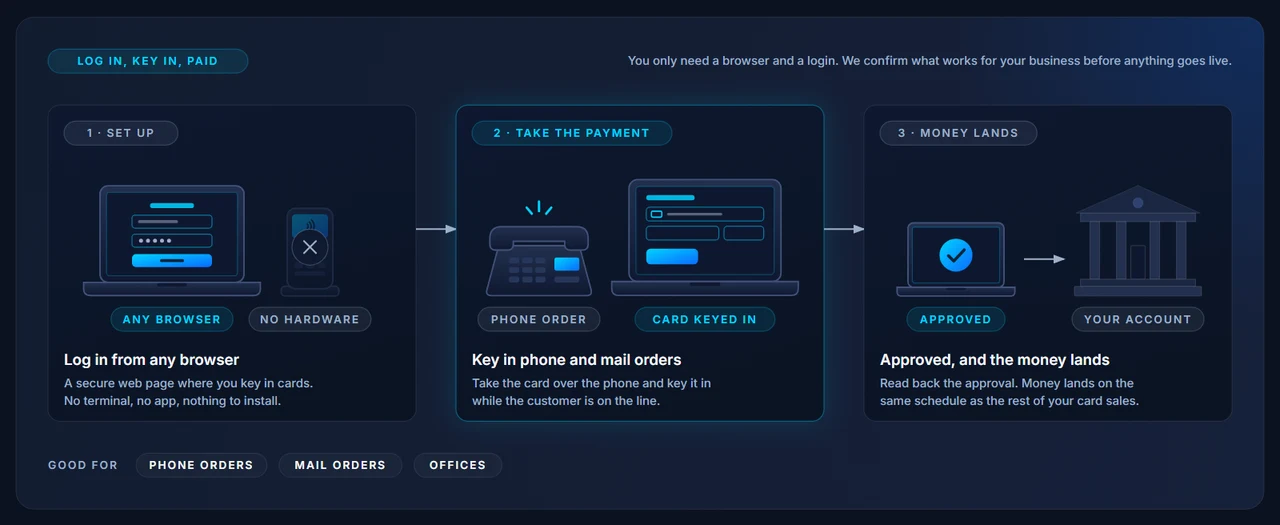
How the virtual terminal works: log in from any browser, key in phone and mail orders, approved and the money lands.

Common questions

What is a virtual terminal?
A virtual terminal is a secure web page where you key in a customer's card details to take a payment for a phone or mail order. There is no hardware needed. You log in from any browser, type the card number, expiration, and amount, and process the payment.
Virtual terminal vs payment gateway, what is the difference?
A virtual terminal is where you key in the card yourself for phone and mail orders. A payment gateway is what powers your online checkout, where the customer enters their own card to pay you on your website. Many businesses use both. Read how a payment gateway works.
Is it secure to key in cards?
Yes. Card data is encrypted in transit and tokenized, so the full card number isn’t stored in your systems. The virtual terminal runs over a secure connection, and you can store cards on file for repeat customers without handling raw card numbers. See how we keep payments secure.
Do I need any hardware or software to install?
No. A virtual terminal runs in your browser. You log in and key in the card. There is nothing to plug in and nothing to install.

See what you’re paying to key in cards

Send us a recent statement and we’ll break down your effective rate and the fees behind it, line by line, so you can compare it honestly.